
If you wish to skip the backstory, go directly to the Authoring Procedure and Usage.
Needs
About a year ago, I decided to shift my focus from programming chess to playing chess. Since then, I’ve played many games online and gotten a feel for blitz and rapid time controls.
I’ve realized a valuable technique for improving my play is to review my games. This is especially important for an adult learner, such as myself, in my 50s. Ideally, immediately after finishing a game, I’ll review it and determine where I erred tactically or where I allowed my opponent to erode my position. Understanding what to do and not do (reflexively consult a chess engine) when reviewing one’s games is a complex topic I won’t explore in this blog post. Rather, I intend to focus on one aspect of a subset of games: For games where I arrived at a difficult or outright losing middlegame position, where did I go astray in the opening?
Where did I go astray in the opening?
To answer this question, I’d like to build a repertoire of my preferred openings as White and Black. To maximize the usefulness of this knowledge for a novice player such as myself, the repertoire should be minimalist and focused on positions I actually encounter in my games. Therefore, I don’t view reliance on commercial opening books such as those offered by Hiarcs or ChessBase as a useful solution. Such comprehensive opening books are valuable. But they contain numerous highly theoretical variations only of use to masters- because only two master-level players ever would arrive at such positions. Or possess sufficient skill to navigate razor sharp continuations arising from positions reachable by patzers. Two patzers either never get there, or, by some miracle, having arrived, are incapable of navigating such dangerous waters (“Here be dragons”). Conversely, commercial opening books exclude positions two patzers often stumble into.
Considering these drawbacks, my preference is to create and maintain a custom opening repertoire tailored to my needs.
I intend to consult this repertoire in my post-game review sessions. Both to understand where I misplayed documented positions, and to expand the repertoire as I encounter new and challenging opening positions. So I asked myself, “How do I create such a repertoire? What software do I use? What procedures do I follow to create it and maintain it?”
How do I create an opening repertoire? What software do I use? What procedures do I follow to create it and maintain it?
First, I defined success.
Constraints on Potential Solutions
- I would like to both author and use my repertoire in Hiarcs Chess Explorer Pro (HCE Pro), if possible.
- As opposed to acquiring specialty software or registering with a new website to manage my repertoire.
- I like the simplicity of relying on only two products for chess play and study: HCE Pro on my local PC + chess.com online.
- I prefer not to use any ChessBase software.
- Even though ChessBase supports creating custom opening books, and HCE Pro supports displaying ChessBase opening books (but not authoring them), I refuse to use ChessBase software.
- ChessBase’s instructional article on Creating Your Own Opening Books contains numerous broken screenshot images.
- More importantly, their GUI has suffered from persistent, annoying screen flickering issues for more than ten years.
- This demonstrates incompetence and / or disregard for customer experience.
- If any intermediate steps are required between authoring and using the repertoire, they should be simple and repeatable.
- Otherwise, the added complexity will deter me from maintaining it.
- I don’t want to build a Rube Goldberg machine.
- I would like to easily navigate between recommended moves and explanations of why those moves are recommended.
Next, I explored options.
Exploring Options
The time I spent exploring options is more accurately described as ruling out options. I thought about my preferences, how much of a kludge I’d tolerate, and drew up the above list of constraints.

I quickly focused my efforts on determining how to coerce the Hiarcs Tree Explorer (shown above) into behaving like an opening advisor. The primary difficulty I faced is the Tree Explorer displays moves and statistics aggregated from the main line of games. This aggregation does not include variations.
Tree Explorer displays moves and statistics aggregated from the main line of games, not from variations. I do not consider this a bug.
I do not consider this a bug. In Portable Game Notation (PGN), the main line describes what actually happened in a game. Variations describe what could have happened had the hero played this or the opponent played that. I consider it a perfectly reasonable decision by the Hiarcs development team to provide a Tree Explorer based on what actually happened in the associated games. After all, a common variation added by annotators is to explain why an obvious or intuitive move doesn’t work (often due to tactics). Including such moves would pollute the Tree Explorer’s statistics. It’s impossible to account for how a move that never was played contributes to White’s or Black’s expected chances to win, draw, or lose.
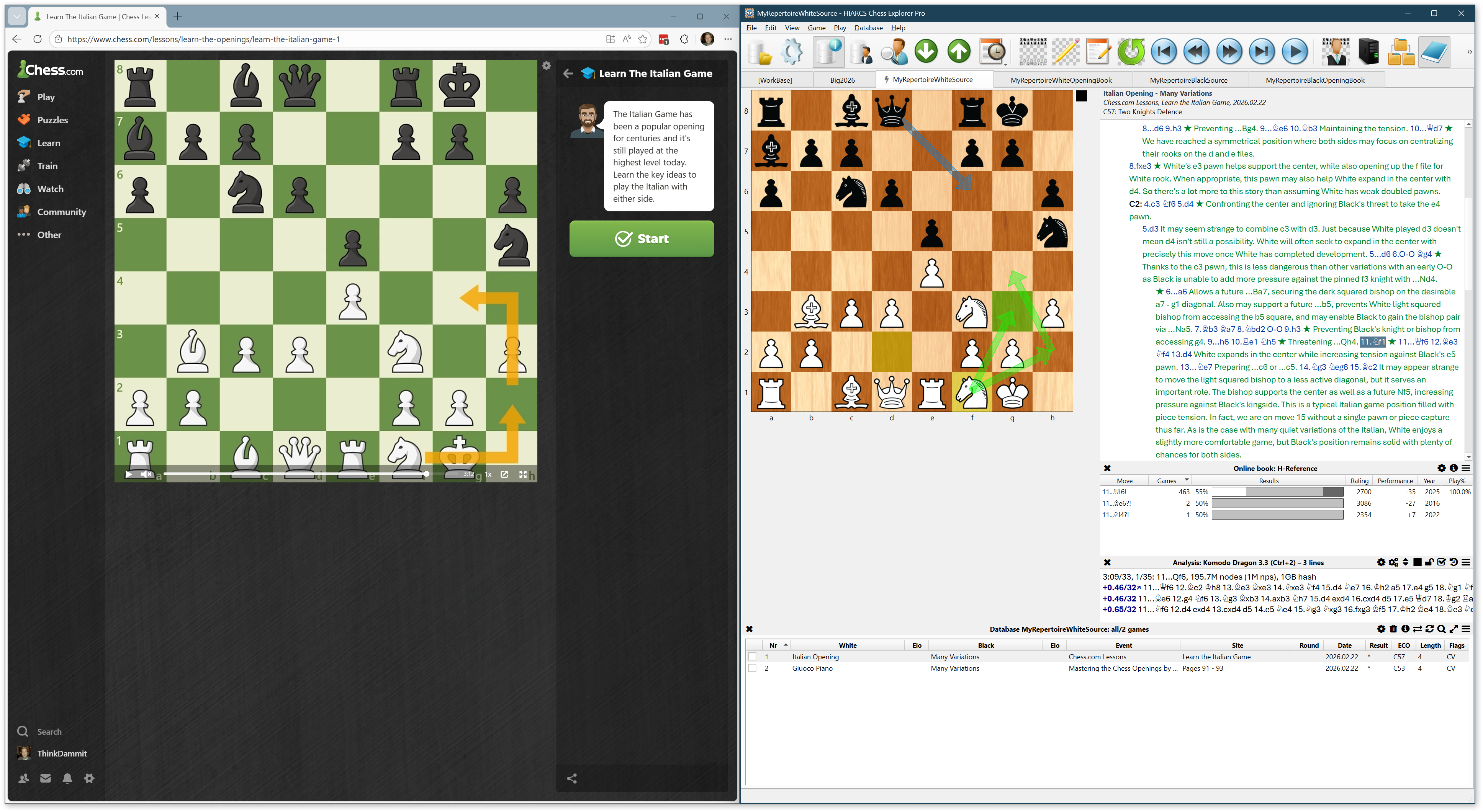
I opened a chess.com lesson on the Italian Opening and snapped it to the left half of my screen. I opened HCE Pro, created a new database, and snapped it to the right half of my screen. I watched the lesson and attempted to add a new game to my HCE database for every interesting variation discussed by the lecturer. I quickly realized this is a tedious, impractical process. I was fighting against HCE Pro, which facilitates quick entry of variations, not games. But, if I was to succeed in coercing the Tree Explorer to behave like an opening advisor, I had to enter one game for every recommend move for every opening position of interest. Or is there a better way?
I decided to use HCE Pro the way it’s intended to be used: I entered numerous variations into a single game. I added comments, colored arrows, and highlighted squares to illustrate the ideas behind recommended moves. Any practical solution must begin with this technique.
Proposal
How to add numerous games to a HCE Pro database (call this the “source database”), each with numerous variations of recommended moves, then automatically transform this into a derivative database (call this the “opening book”) with one game per variation? That would create a database of games with nothing other than a main line. Therefore, all the positions and moves I entered into the source database would appear in a Tree Explorer connected to the derivative database.
How to accomplish this? I propose the following procedure.
Authoring Procedure
Download the PGN Extract command-line program.
All steps performed in HCE Pro unless otherwise noted.
- Create a source database via File > New.
- Name it “MyRepertoireWhiteSource”.
- Save it as a .hce file for optimal performance.
- Add a game via Game > New or Ctrl+N.
- Save the empty game via Game > Save or Ctrl+S.
- I recommend repurposing White, Black, Event and Site columns for Opening, Branch, Source, and Location.
- For example: White = Italian Opening, Black = Many Variations, Event = Chess.com Lessons, Site = Learn the Italian Game
- For example: White = Caro-Kann Defense, Black = Panov Attack, Event = John Watson Openings Vol 1, Site = Pages 256 – 261
- Add moves to main line and variations, saving periodically.
- Whether moves are located in the main line or in a variation has no impact on how they’re displayed in Tree Explorer.
- Add comments, colored arrows, and square highlights to explain the rationale of recommended moves.
- Never enter a weak White move in the White repertoire.
- If you feel a need to explain why a White move is weak…
- Do so in text comments, not actual variations.
- Enter refutation variations in the Black repertoire.
- If you encounter this position as Black, you’ll know how to punish White’s weak move.
- Same restrictions for Black moves in the Black repertoire.
- Add more games and variations based on your preferred authoring structure.
- Decide what belongs together in a single game.
- Decide what to segregate into separate games.
- Export the repertoire source via File > Export.
- Format = PGN database
- Games = Database
- Filename = MyRepertoireWhiteSource.pgn
- Transform the repertoire source by running the following command.
- .\pgn-extract.exe --splitvariants --output MyRepertoireWhiteOpeningBook.pgn MyRepertoireWhiteSource.pgn
- This transforms the variation-dense source database to a one-game-per-variation opening book.
- Create an opening database via File > New.
- Name it “MyRepertoireWhiteOpeningBook”.
- Save it as a .hce file for optimal performance.
- Import games via File > Import >MyRepertoireWhiteOpeningBook.pgn
Usage
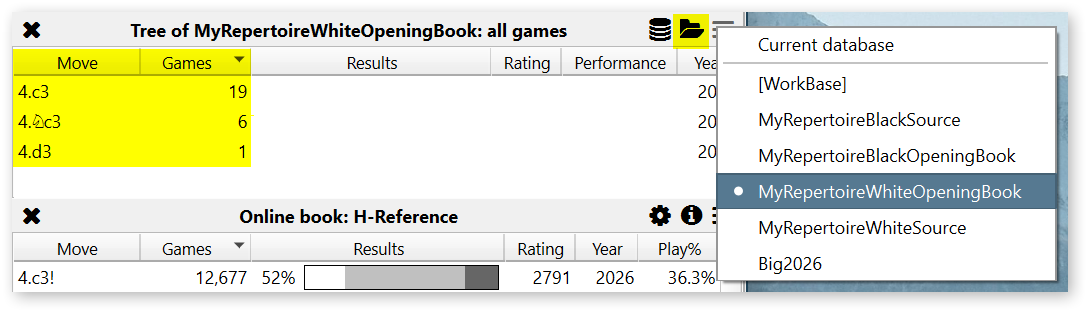
In HCE Pro, open the MyRepertoireWhiteOpeningBook.hce database (assuming you played White). Open a game you’d like to review and navigate to your opponent’s move immediately before you went astray in the opening. Click View > Tree Explorer and select the MyRepertoireWhiteOpeningBook database.
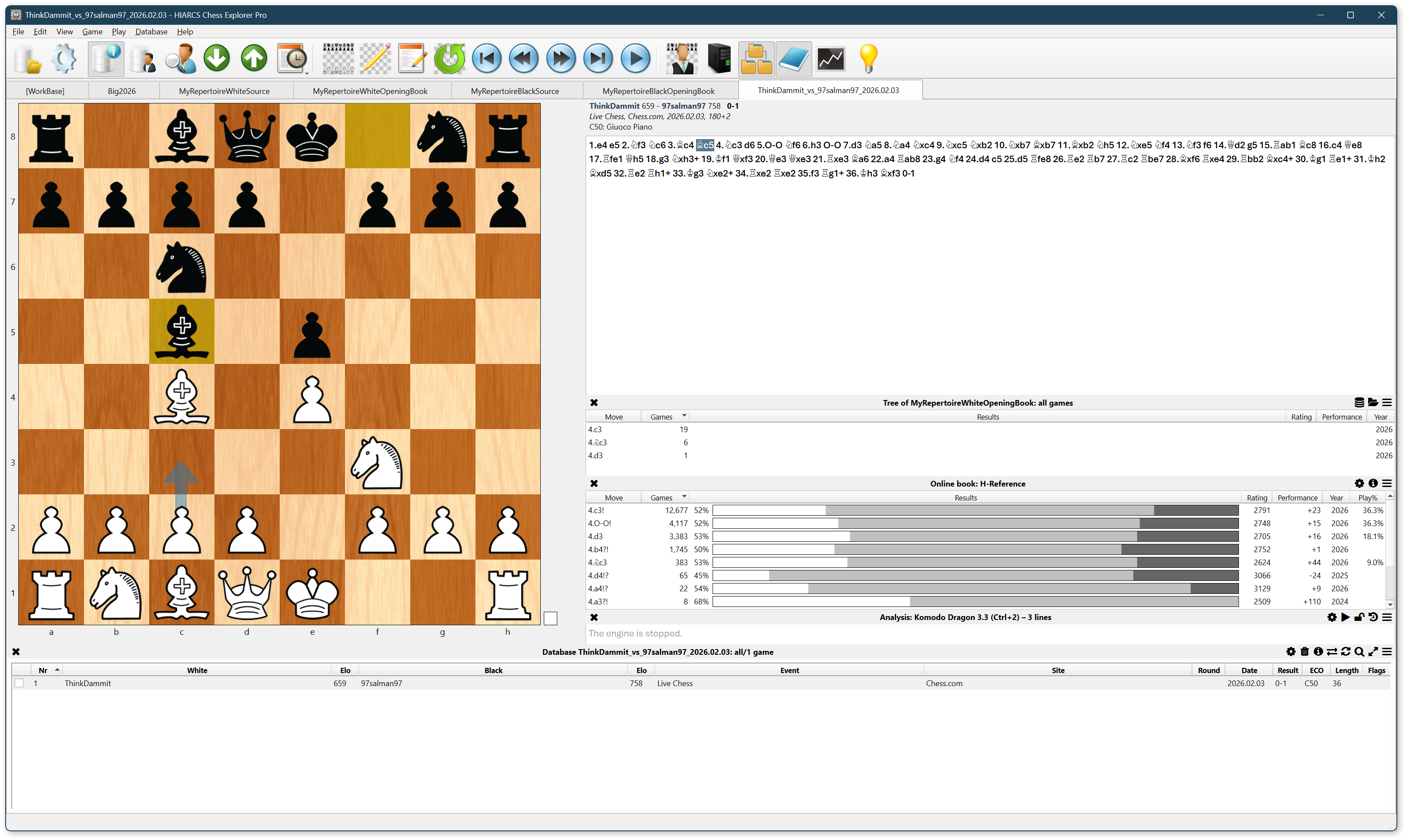
The Tree Explorer displays a list of recommended moves from your repertoire, alongside a count of games for each move. The count actually represents a count of variations.
In the game, I played 4.Nc3.
Let’s assume I’m not happy with my play and would like to explore alternative moves from my repertoire, though I don’t remember ideas behind the moves. Click the 4.c3 move in the Tree Explorer. HCE Pro adds a variation to your game.
Now click the folder icon to open a dialog with a list of games (actually variations) that illustrate possible continuations from 4.c3. Use your mouse or Ctrl-UpArrow and Ctrl-DownArrow to select variations in the list. Notice the chessboard and move list in the dialog display colored arrows, highlighted squares, and comments. Check the box in the leftmost column of the list for interesting variations. Click the Insert Into Current Game button to insert the selected variations into your game.
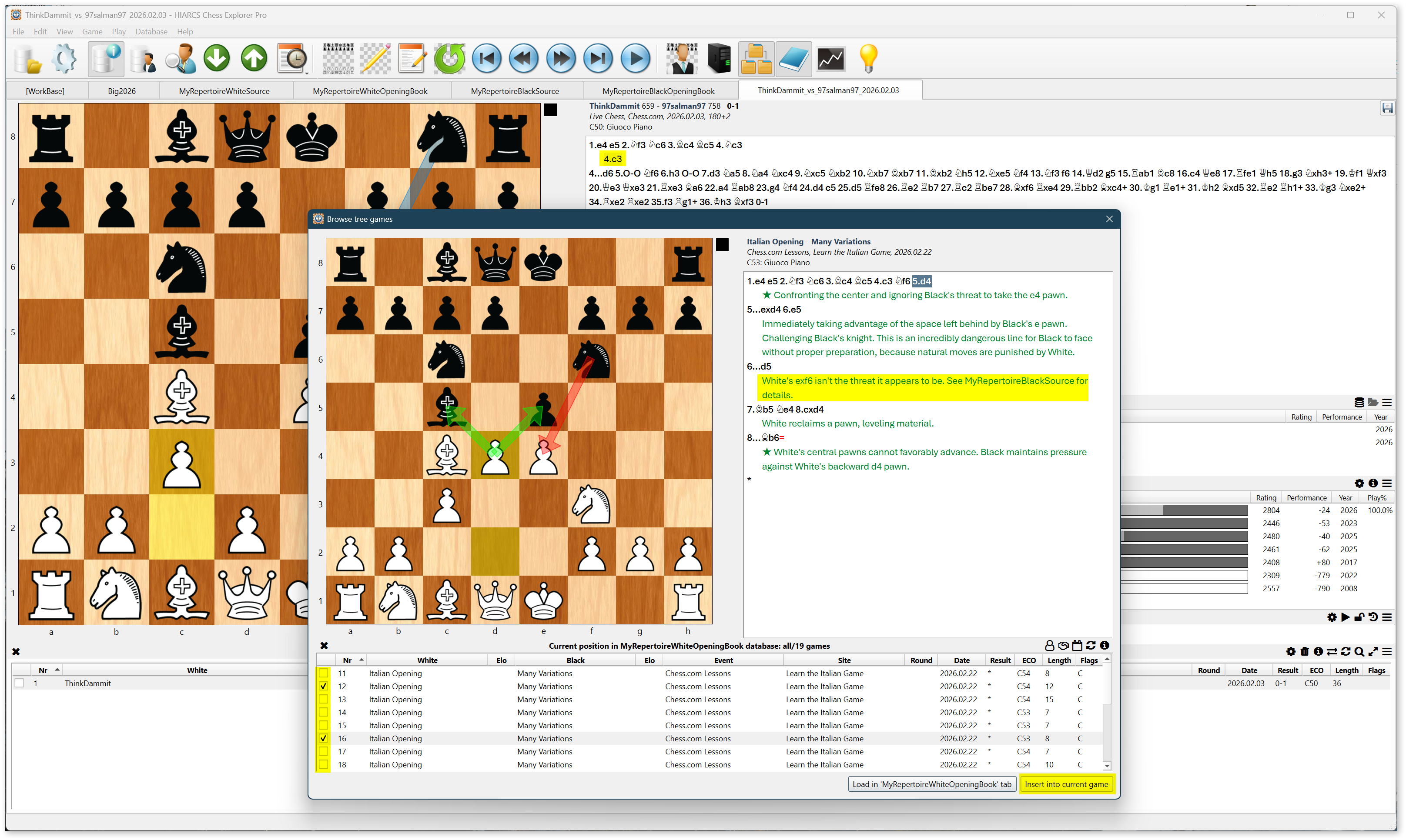
Notice variation 16 in the above screenshot contains a comment warning a particular White move “isn’t the threat it appears to be.” Notice the warning is expressed in a text comment, not a variation, so the Tree Explorer will not suggest 7.exf6. The comment refers to your Black repertoire if you wish to see the refutation of 7.exf6.
You’ve made it to the end of a long, technical blog post. I hope I’ve clearly described a process for authoring and using a personal opening repertoire. I hope the process I’ve proposed isn’t too cumbersome and benefits your opening preparation. Let me know in the comments.
 I work as a Software Architect at an insurance company. We're building a modern tech stack in the cloud using C#, Azure, ASP.NET Core, Angular, TypeScript, etc.