Running Multiple Engine Tournaments Simultaneously With the Myracle GUI

A New Engine-Focused GUI

Martin Sedlák, long time member of the chess programming community and author of the Cheng engine, has written a chess GUI named Myracle. Martin has generously provided Myracle free of charge.

Myracle is GUI that specializes in running chess engine tournaments. In this it excels.

Myracle has a killer feature that convinced me to uninstall the Cute Chess GUI and rely solely on Myracle for all chess engine testing. A few days ago, I posted on TalkChess, “Recently, I used the Myracle GUI to run four divisional 5+3 blitz tournaments plus three cross-division tournaments simultaneously. Then did the same for 15+10 rapid tournaments. I had not established ratings for these time controls. These were the initial games to establish engine ratings.” I thanked Martin for the killer feature:

It’s so great to have the capability to run multiple tournaments simultaneously, each drawing from a shared CPU budget. No other chess engine GUI enables me to manage this in one instance of the GUI. The Myracle GUI was rock solid and ran for days (a couple weeks, I think) without any issues.

Why is the combination of simultaneous tournaments + a shared CPU budget in one instance of the GUI a killer feature? Because “This makes it possible to monitor the Elo of all engines (via Ordo) as additional games reduce error bars and Elo ratings stabilize.”

In my TalkChess post, I mentioned a quirk of my simultaneous multiple tournament setup: “The cross-division tournaments ensure all engines are connected- so we don’t have four isolated divisions with no cross-play between them. I configured the cross-division tournaments to run fewer games than the divisional tournaments. I just need enough games so Ordo can determine ratings for all engines without complaining about disconnected groups.”

Then I shamelessly requested a feature despite Martin’s pleas that users focus on reporting bugs instead of requesting features. Because the feature I had in mind is related to prioritizing tournament resources to control tourney completion time, I figured I’d mention it because it’s likely a topic important to more serious engine testers than me.

I’ll come back to this tourney priority issue later. Now I’ll explain how I use Myracle to run multiple tournaments simultaneously.

Running Multiple Tournaments Simultaneously

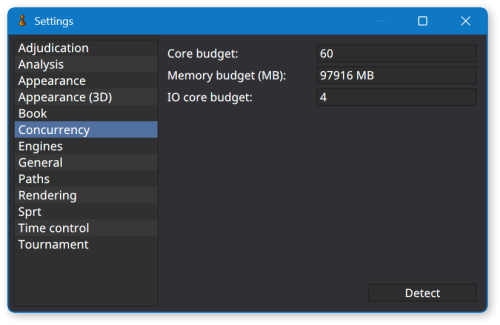
Click Tools > Settings. Select Concurrency in the left panel of the Settings dialog. Set your CPU core budget. I have a 64 core PC, so I set my budget to 60 cores, leaving 4 cores (8 logical processors) for the operating system and other applications.
Click Tournament > New Tournament. Create a round robin tournament named Division 1. Assign a corresponding Div1.pgn filename. Select engines that belong in this topmost division, cycles, time control, book, adjudication, etc.
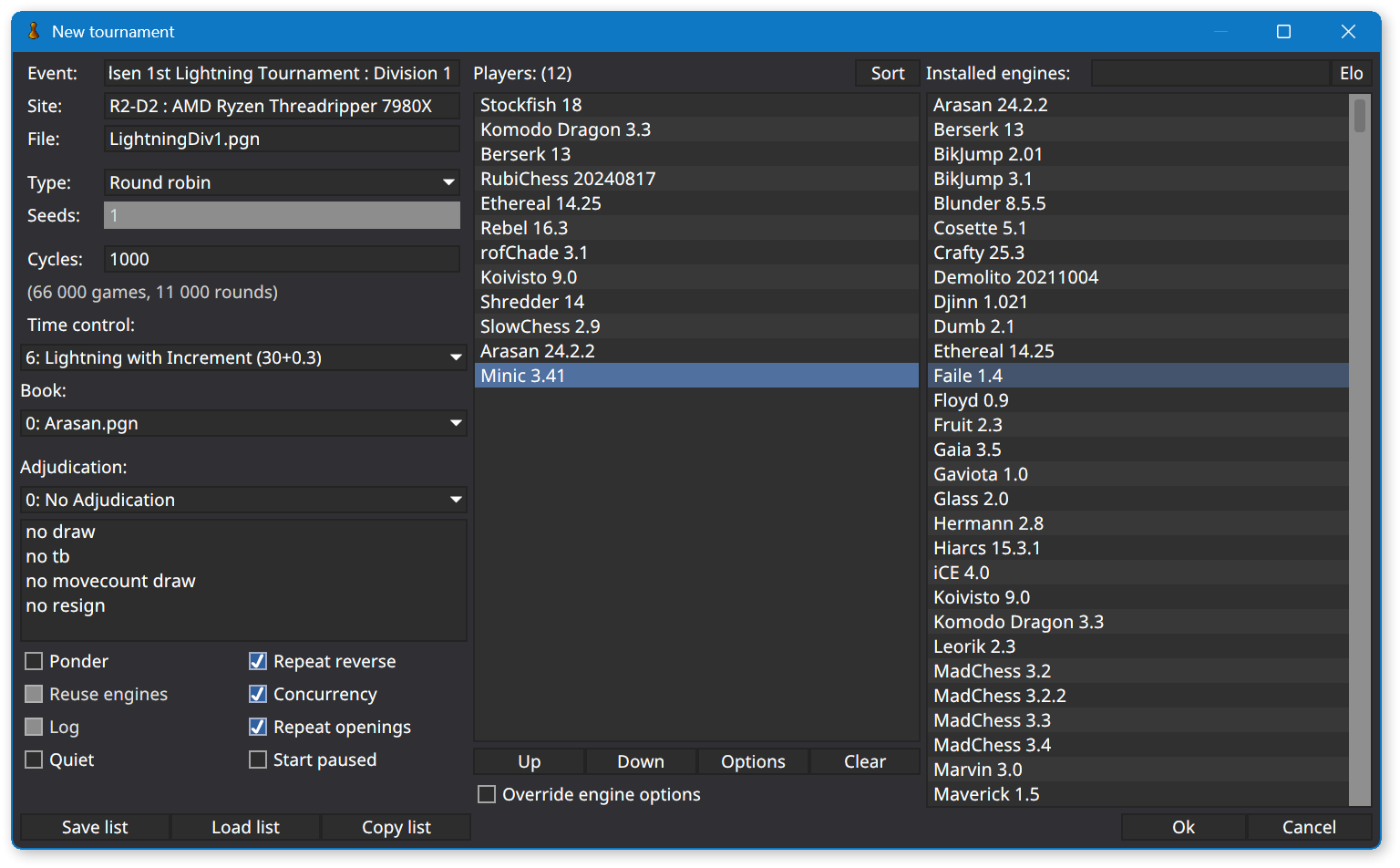
Click the OK button. Myracle will allocate all 60 CPU cores from the concurrency budget to Division 1 games.

Click Tournament > New Tournament. Create a round robin tournament named Division 2. Click the OK button. As games from Division 1 complete, Myracle will allocate CPU cores to Division 2 games until 30 cores are assigned to each divisional tournament. Repeat the process for Division 3 (Myracle will allocate 20 cores to each divisional tournament), etc.

Ensuring Engines Are “Connected” To Make Rating Estimation Possible

Now, to satisfy the Ordo rating utility, create cross-division tournaments. Create a Divisions 1-2 tournament, a Divisions 2-3 tournament, etc. This eliminates disconnected groups of engines whose ratings cannot be estimated because, without cross-divisional tournaments, the engines compete in isolated rating pools.

I realize cross-divisional tournaments are not needed if you already have a collection of engine games. Ordo can successfully estimate engine ratings when provided existing games and new games run by the Myracle GUI. However, this technique is valuable if you’re establishing a new “virgin” rating list (perhaps with different time control, opening book, pondering, adjudication, or tablebase settings than existing rating lists you maintain. In my typical setup, cross-division tournaments include fewer engines than divisional tournaments, and therefore, require fewer games even if each engine plays the same number of games against each opponent as in divisional tournaments.

I realize cross-divisional tournaments are not needed if you already have a collection of engine games… However, this technique is valuable if you’re establishing a new “virgin” rating list.

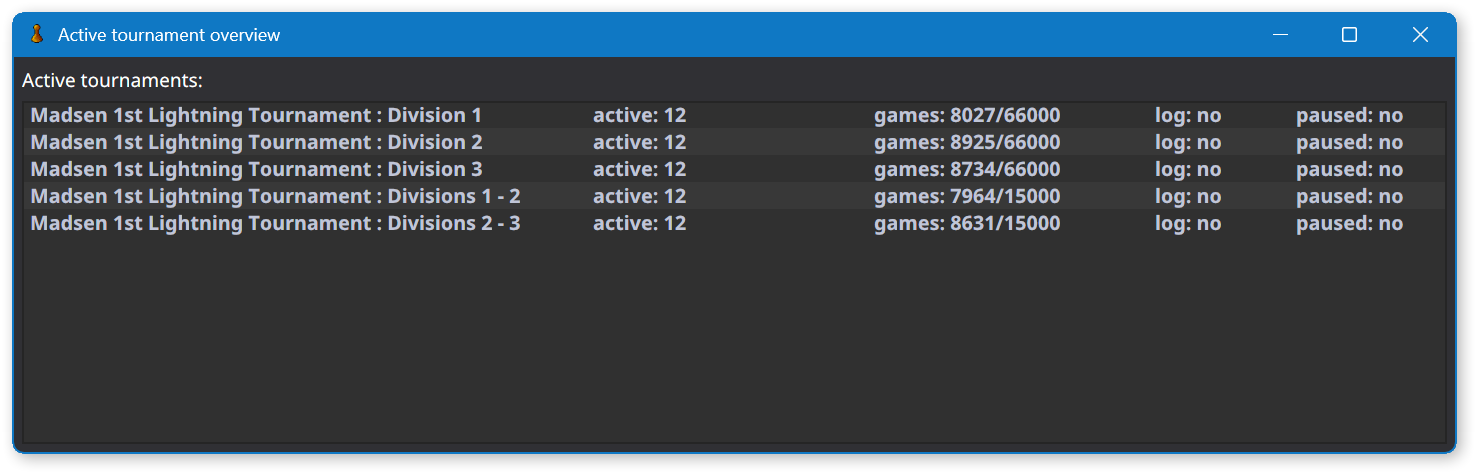
Click View > View Active Tournaments. Myracle displays the divisional and cross-division tournaments you’ve started, along with counts of each tourney’s active & completed & total games, and an indication whether each tourney is active or paused. Pausing an individual tourney frees up CPU cores to be allocated to the remaining active tournaments.
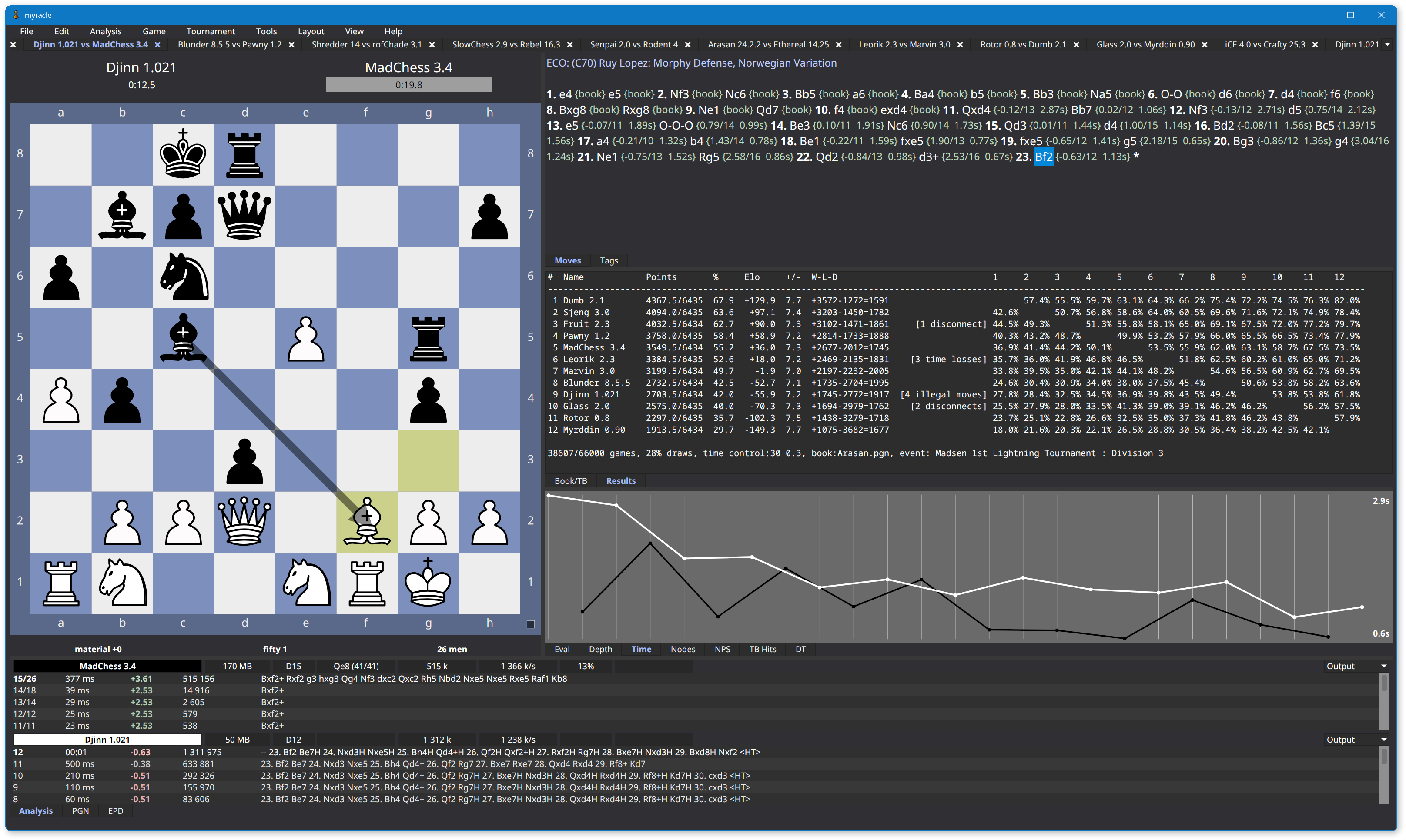
While the tournaments are progressing, you may watch games via Myracle’s tabbed windows.
Also while the tournaments are progressing, run the Ordo utility to estimate engine ratings. Include the PGN filename of every divisional and cross-division tourney. Notice how three engines at the bottom of Division 1 have played more games than other engines due to participating in both the Division 1 tourney and the Divisions 1-2 tourney. In the cross-division tourney, they compete against the top three engines from Division 2 (not shown).

.\ordo-win64.exe -m LightningAnchors.txt -U "0,1,2,6,4,7,8,9,5,11" --exclude=ExcludedEngines.txt `
  -o ComputerGamesLightning.txt -j ComputerGamesLightningMatchups.txt -W -D -s 10 -M `
  LightningDiv1.pgn LightningDiv2.pgn LightningDiv3.pgn LightningDiv1-2.pgn LightningDiv2-3.pgn
   # PLAYER                :  RATING  ERROR  CFS(%)  PLAYED     W     D     L   (%)  OppAvg
   1 Stockfish 16.1        :  3805.0    4.3     100    7115  2961  4130    24    71  3643.9
   2 Komodo Dragon 3.3     :  3757.5    4.3      55    7113  2246  4665   202    64  3648.3
   3 Berserk 13            :  3757.0    5.6     100    7114  2232  4685   197    64  3648.3
   4 RubiChess 20240817    :  3710.3    5.6     100    7115  1559  5096   460    58  3652.6
   5 Ethereal 14.25        :  3695.5    5.9     100    7114  1382  5144   588    56  3653.9
   6 Koivisto 9.0          :  3655.7    7.2      94    7114  1015  5052  1047    50  3657.6
   7 Rebel 16.3            :  3650.0   ----     100    7114   905  5192  1017    49  3658.1
   8 rofChade 3.1          :  3638.8    5.3     100    7115   864  5003  1248    47  3659.1
   9 Shredder 14           :  3564.2    5.3      51    7113   350  4509  2254    37  3665.9
  10 Arasan 24.2.2         :  3564.1    3.6      56   12114  1874  7453  2787    46  3592.0
  11 SlowChess 2.9         :  3563.7    3.5     100   12114  1844  7497  2773    46  3592.1
  12 Minic 3.41            :  3526.7    4.5     100   12113  1368  7148  3597    41  3597.1
     etc

Due to fewer games, the cross-division tournaments will complete before the divisional tournaments. This frees up CPU cores to be allocated to the remaining active tournaments.
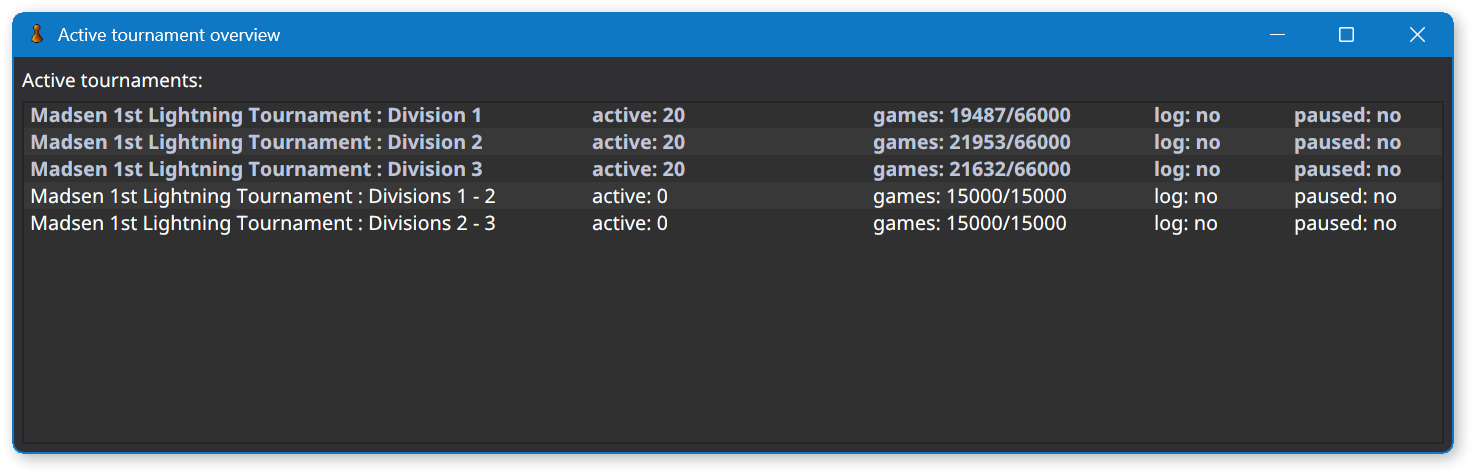
You may start another tournament unrelated to the new rating list you’re establishing. Myracle will fairly allocated CPU cores to the unrelated tourney. For example, in addition to the new Lightning (30s + 0.3s) rating list I’m establishing, I decided to update Stockfish’s rating in my Bullet list by running a gauntlet tourney with the latest version of the engine. You may start as many tournaments as you wish. Myracle will fairly allocate CPU cores to each active tournament.
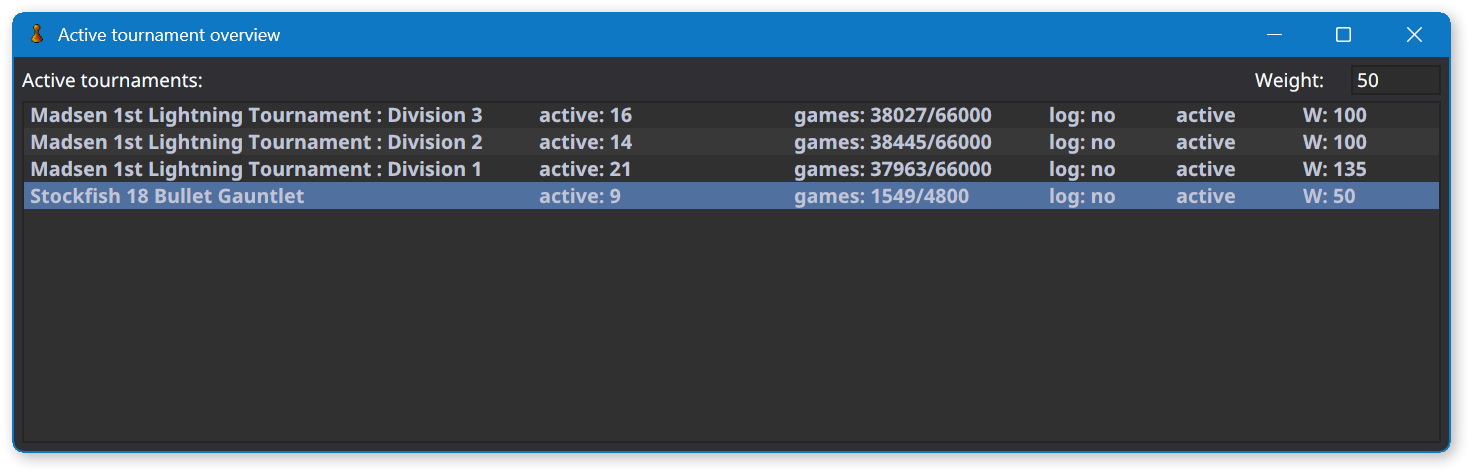
Adjusting Priority of Individual Tournaments

If you’re paying close attention, you noticed a new column in the last screenshot. That’s connected to my shameless request:

A nice feature to address this [cross-division tourneys completing before divisional tourneys] would be if Myracle’s View Active Tournaments dialog provided a column where I can enter a weight or a percentage, indicating how the scheduler should assign CPUs to games (favoring some tournaments over others). This would enable me to reduce the weight of the cross-division tournaments so they complete approximately at the same time as the larger divisional tournaments.

Two days later, Martin implemented the feature!

As you can see in the screenshot above, I’m using it and- at a glance- the scheduler appears to allocate CPU cores in accordance with tourney weights. Martin was quick to point out slow time controls may clog the scheduler. That isn’t the case with my mix of Lightning and Bullet time controls. A Lightning time control combined with an ample CPU budget ensures a game completes every few seconds, making it easy for the scheduler to allocate CPU cores in accordance with tourney weights.

Adjusting weights when exclusively running long time control tourneys is more likely to cause either idle CPU cores or unfair allocation of CPU cores. But, in my opinion, attempting to fine tune tourney priority in such a simultaneous multiple tournament setup falls more in the realm of user error (magical thinking) than application bug.

This post is by no means an exhaustive review of the Myracle GUI. It has many other excellent features. But it’s more helpful to focus on a single topic- running multiple tournaments simultaneously- than attempt to cover everything. Check out the Myracle GUI. I think you’ll enjoy working with it!

MadChess 3.4 Released

I have released version 3.4 of my chess engine. This release is focused on simplifying code.

The engine is not any stronger than MadChess 3.3 at bullet time control, though perhaps it’s stronger at blitz and rapid time controls. I don’t know. I haven’t measured the strength of MadChess in blitz and rapid games since version 3.0.

As a first step toward establishing more complete ratings of MadChess and other engines, I have run multi-division round robin tournaments at blitz and rapid time controls. These tournaments include 48 engines in four divisions, with MadChess 3.4 participating in Division 3. See the Ratings page for details.

See the Release/3.4 Pull Request for details of source code changes in version 3.4.

You may download x64 and x86 versions of MadChess 3.4 from the Downloads page. Install the appropriate version for your computer’s CPU. The x64 binary is the strongest version of the engine.

Create an Opening Repertoire Using Hiarcs Chess Explorer Pro and Pgn-Extract.exe

If you wish to skip the backstory, go directly to the Authoring Procedure and Usage.

Needs

About a year ago, I decided to shift my focus from programming chess to playing chess. Since then, I’ve played many games online and gotten a feel for blitz and rapid time controls.

I’ve realized a valuable technique for improving my play is to review my games. This is especially important for an adult learner, such as myself, in my 50s. Ideally, immediately after finishing a game, I’ll review it and determine where I erred tactically or where I allowed my opponent to erode my position. Understanding what to do and not do (reflexively consult a chess engine) when reviewing one’s games is a complex topic I won’t explore in this blog post. Rather, I intend to focus on one aspect of a subset of games: For games where I arrived at a difficult or outright losing middlegame position, where did I go astray in the opening?

Where did I go astray in the opening?

To answer this question, I’d like to build a repertoire of my preferred openings as White and Black. To maximize the usefulness of this knowledge for a novice player such as myself, the repertoire should be minimalist and focused on positions I actually encounter in my games. Therefore, I don’t view reliance on commercial opening books such as those offered by Hiarcs or ChessBase as a useful solution. Such comprehensive opening books are valuable. But they contain numerous highly theoretical variations only of use to masters- because only two master-level players ever would arrive at such positions. Or possess sufficient skill to navigate razor sharp continuations arising from positions reachable by patzers. Two patzers either never get there, or, by some miracle, having arrived, are incapable of navigating such dangerous waters (“Here be dragons”). Conversely, commercial opening books exclude positions two patzers often stumble into.

Considering these drawbacks, my preference is to create and maintain a custom opening repertoire tailored to my needs.

I intend to consult this repertoire in my post-game review sessions. Both to understand where I misplayed documented positions, and to expand the repertoire as I encounter new and challenging opening positions. So I asked myself, “How do I create such a repertoire? What software do I use? What procedures do I follow to create it and maintain it?”

How do I create an opening repertoire? What software do I use? What procedures do I follow to create it and maintain it?

First, I defined success.

Constraints on Potential Solutions

  1. I would like to both author and use my repertoire in Hiarcs Chess Explorer Pro (HCE Pro), if possible.
    1. As opposed to acquiring specialty software or registering with a new website to manage my repertoire.
    2. I like the simplicity of relying on only two products for chess play and study: HCE Pro on my local PC + chess.com online.
  2. I prefer not to use any ChessBase software.
    1. Even though ChessBase supports creating custom opening books, and HCE Pro supports displaying ChessBase opening books (but not authoring them), I refuse to use ChessBase software.
    2. ChessBase’s instructional article on Creating Your Own Opening Books contains numerous broken screenshot images.
    3. More importantly, their GUI has suffered from persistent, annoying screen flickering issues for more than ten years.
    4. This demonstrates incompetence and / or disregard for customer experience.
  3. If any intermediate steps are required between authoring and using the repertoire, they should be simple and repeatable.
    1. Otherwise, the added complexity will deter me from maintaining it.
    2. I don’t want to build a Rube Goldberg machine.
  4. I would like to easily navigate between recommended moves and explanations of why those moves are recommended.

Next, I explored options.

Exploring Options

The time I spent exploring options is more accurately described as ruling out options. I thought about my preferences, how much of a kludge I’d tolerate, and drew up the above list of constraints.

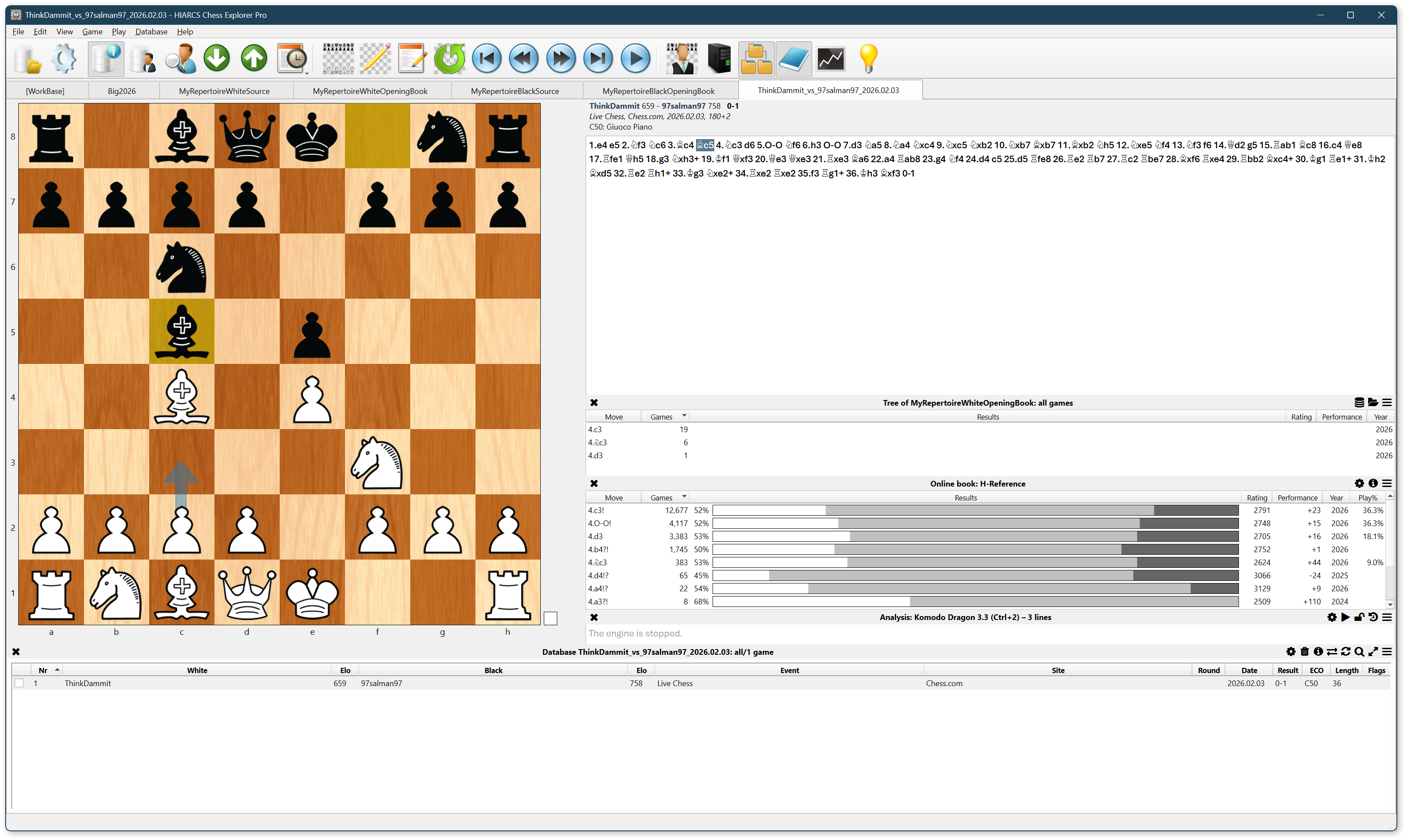
I quickly focused my efforts on determining how to coerce the Hiarcs Tree Explorer (shown above) into behaving like an opening advisor. The primary difficulty I faced is the Tree Explorer displays moves and statistics aggregated from the main line of games. This aggregation does not include variations.

Tree Explorer displays moves and statistics aggregated from the main line of games, not from variations. I do not consider this a bug.

I do not consider this a bug. In Portable Game Notation (PGN), the main line describes what actually happened in a game. Variations describe what could have happened had the hero played this or the opponent played that. I consider it a perfectly reasonable decision by the Hiarcs development team to provide a Tree Explorer based on what actually happened in the associated games. After all, a common variation added by annotators is to explain why an obvious or intuitive move doesn’t work (often due to tactics). Including such moves would pollute the Tree Explorer’s statistics. It’s impossible to account for how a move that never was played contributes to White’s or Black’s expected chances to win, draw, or lose.

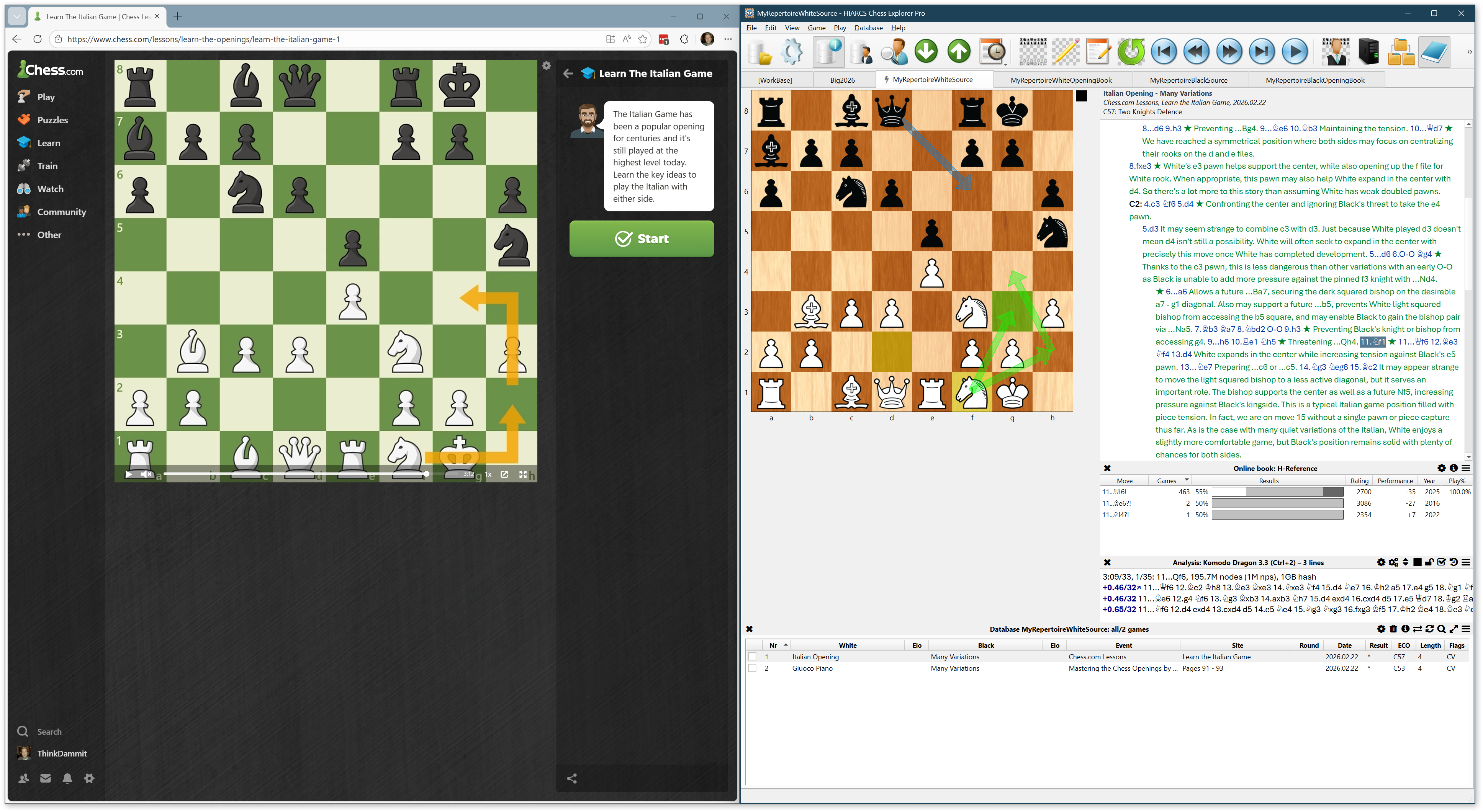
I opened a chess.com lesson on the Italian Opening and snapped it to the left half of my screen. I opened HCE Pro, created a new database, and snapped it to the right half of my screen. I watched the lesson and attempted to add a new game to my HCE database for every interesting variation discussed by the lecturer. I quickly realized this is a tedious, impractical process. I was fighting against HCE Pro, which facilitates quick entry of variations, not games. But, if I was to succeed in coercing the Tree Explorer to behave like an opening advisor, I had to enter one game for every recommend move for every opening position of interest. Or is there a better way?

I decided to use HCE Pro the way it’s intended to be used: I entered numerous variations into a single game. I added comments, colored arrows, and highlighted squares to illustrate the ideas behind recommended moves. Any practical solution must begin with this technique.

Proposal

How to add numerous games to a HCE Pro database (call this the “source database”), each with numerous variations of recommended moves, then automatically transform this into a derivative database (call this the “opening book”) with one game per variation? That would create a database of games with nothing other than a main line. Therefore, all the positions and moves I entered into the source database would appear in a Tree Explorer connected to the derivative database.

How to accomplish this? I propose the following procedure.

Authoring Procedure

Download the PGN Extract command-line program.

All steps performed in HCE Pro unless otherwise noted.

  1. Create a source database via File > New.
    1. Name it “MyRepertoireWhiteSource”.
    2. Save it as a .hce file for optimal performance.
  2. Add a game via Game > New or Ctrl+N.
  3. Save the empty game via Game > Save or Ctrl+S.
    1. I recommend repurposing White, Black, Event and Site columns for Opening, Branch, Source, and Location.
    2. For example: White = Italian Opening, Black = Many Variations, Event = Chess.com Lessons, Site = Learn the Italian Game
    3. For example: White = Caro-Kann Defense, Black = Panov Attack, Event = John Watson Openings Vol 1, Site = Pages 256 – 261
  4. Add moves to main line and variations, saving periodically.
    1. Whether moves are located in the main line or in a variation has no impact on how they’re displayed in Tree Explorer.
    2. Add comments, colored arrows, and square highlights to explain the rationale of recommended moves.
    3. Never enter a weak White move in the White repertoire.
    4. If you feel a need to explain why a White move is weak…
      1. Do so in text comments, not actual variations.
      2. Enter refutation variations in the Black repertoire.
      3. If you encounter this position as Black, you’ll know how to punish White’s weak move.
    5. Same restrictions for Black moves in the Black repertoire.
  5. Add more games and variations based on your preferred authoring structure.
    1. Decide what belongs together in a single game.
    2. Decide what to segregate into separate games.
  6. Export the repertoire source via File > Export.
    1. Format = PGN database
    2. Games = Database
    3. Filename = MyRepertoireWhiteSource.pgn
  7. Transform the repertoire source by running the following command.
    1. .\pgn-extract.exe --splitvariants --output MyRepertoireWhiteOpeningBook.pgn MyRepertoireWhiteSource.pgn
    2. This transforms the variation-dense source database to a one-game-per-variation opening book.
  8. Create an opening database via File > New.
    1. Name it “MyRepertoireWhiteOpeningBook”.
    2. Save it as a .hce file for optimal performance.
  9. Import games via File > Import >MyRepertoireWhiteOpeningBook.pgn

Usage

In HCE Pro, open the MyRepertoireWhiteOpeningBook.hce database (assuming you played White). Open a game you’d like to review and navigate to your opponent’s move immediately before you went astray in the opening. Click View > Tree Explorer and select the MyRepertoireWhiteOpeningBook database.

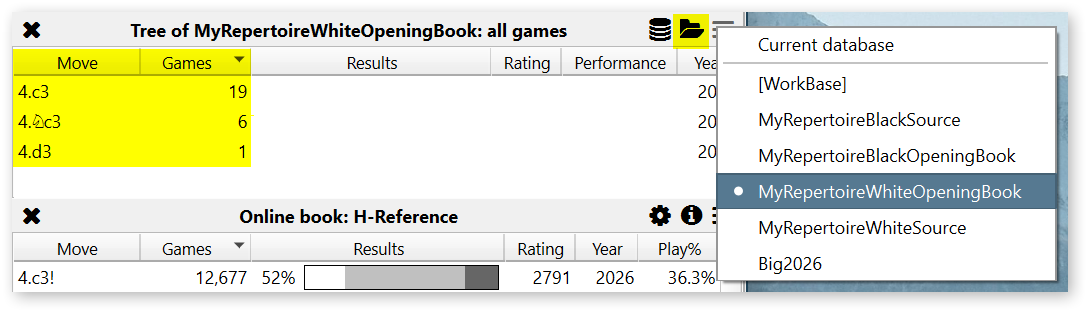
The Tree Explorer displays a list of recommended moves from your repertoire, alongside a count of games for each move. The count actually represents a count of variations.

In the game, I played 4.Nc3.

Let’s assume I’m not happy with my play and would like to explore alternative moves from my repertoire, though I don’t remember ideas behind the moves. Click the 4.c3 move in the Tree Explorer. HCE Pro adds a variation to your game.

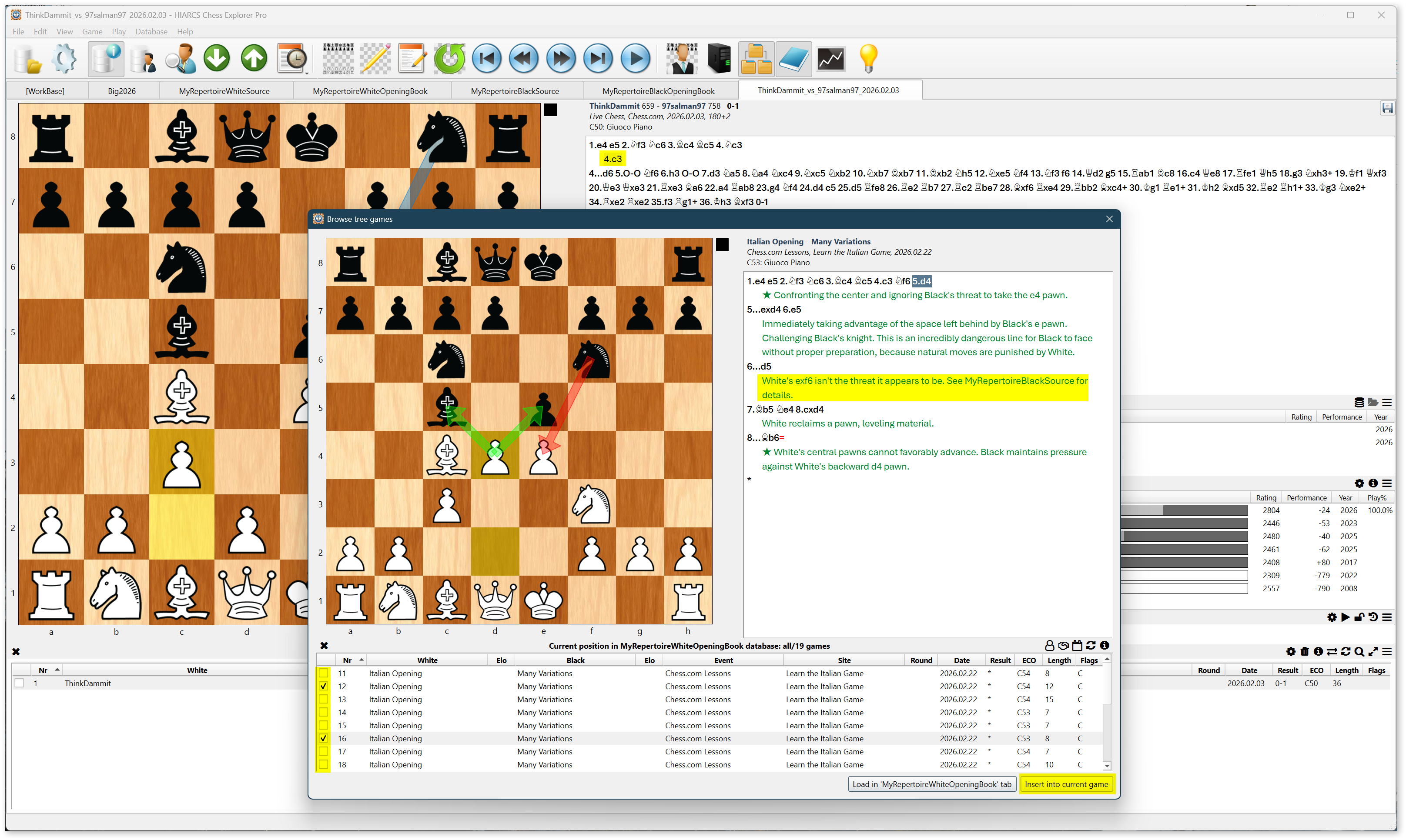
Now click the folder icon to open a dialog with a list of games (actually variations) that illustrate possible continuations from 4.c3. Use your mouse or Ctrl-UpArrow and Ctrl-DownArrow to select variations in the list. Notice the chessboard and move list in the dialog display colored arrows, highlighted squares, and comments. Check the box in the leftmost column of the list for interesting variations. Click the Insert Into Current Game button to insert the selected variations into your game.

Notice variation 16 in the above screenshot contains a comment warning a particular White move “isn’t the threat it appears to be.” Notice the warning is expressed in a text comment, not a variation, so the Tree Explorer will not suggest 7.exf6. The comment refers to your Black repertoire if you wish to see the refutation of 7.exf6.

You’ve made it to the end of a long, technical blog post. I hope I’ve clearly described a process for authoring and using a personal opening repertoire. I hope the process I’ve proposed isn’t too cumbersome and benefits your opening preparation. Let me know in the comments.

MadChess 3.3 Released

I have released version 3.3 of my chess engine.

This release adds static exchange evaluation and integrates it into futility pruning and deferring the search of losing captures. This pushed MadChess’ playing strength above 2800 Elo.

In addition, I adjusted formulas used to calculate internal limit-strength engine parameters to be based on 2800 Elo instead of 2600 Elo. If you adjusted any values in the MadChess.AdvancedConfig.json file, please recalculate per instructions included in comments in the file. The engine’s UCI_Elo option still has a max value of 2600, though, because the non-PVS search (alpha / beta window remains open at the root in order to determine exact scores for more than a single move) used in limit-strength mode significantly increases time-to-depth compared to a PVS search, reducing engine strength.

You may download x64 and x86 versions of MadChess 3.3 from the Downloads page. Install the appropriate version for your computer’s CPU. The x64 binary is the strongest version of the engine.

Do Tough Things

I read an interesting post on a computer chess forum last night. It began:

Dixondeuxyeux’s Post

I thought I would share a few observations that might be of interest to some of you. It was Mark Twain who wrote, “It ain’t what you don’t know that gets you into trouble. It’s what you know for sure that just ain’t so.” I like this adage because it is a humbling reminder that the game we enjoy so much is a brutally honest and cruel taskmaster. It is believed that after the first nine moves of any game, the possible continuations outnumber all the atoms in the known universe. Chess is a mix of mental logic, mathematical calculation, emotional risk, physical courage and a hint of spiritual enlightenment. When we play chess, we place our egos and our sense of self on the line every game. Have you ever lost a game and wanted to crush the world, lash out at your opponent, question your reason for living? I have. Have you ever seen a fight break out during or after a match? I have. If chess is just a game, why are we so prone to violence? Kasparov said that chess would have a lot more adherents if it were correctly seen as a blood sport.

The entire post, written by a Swede with username dixondeuxyeux, is worth reading here: I Play Computer Chess To Lose.

The Swede’s post got me thinking about chess, games, and life in general. I composed a response. Stayed up two hours later than I had planned to ensure I properly expressed the thoughts swirling in my head. I’ll share my response here, with minor edits for clarity.

My Response

Thank you dixondeuxyeux for sharing your thoughts. Great quote from Twain.

Your post got me thinking late on a Friday night.

Personally, I feel it’s beneficial for your mental health to do things you’re not expert at. (We GenXers+ should say so often to Gen Zers and other victims of social media overexposure.) I am expert in certain areas of my (software development) career, though I’d never describe myself in such terms outside of here to make a point. (Scandinavians will recognize my hesitancy is due to Jantelagen, taught to me by my father.) Should I focus only on those areas in which I’m proficient? No, that would stroke my ego, which is pointless.

I feel it’s beneficial for your mental health to do things you’re not expert at. We GenXers+ should say so often to Gen Zers and other victims of social media overexposure.

Struggle, be uncomfortable, make mistakes, practice, push yourself to improve. It helps you keep an even keel and take things in stride when real shit happens. You know… life.

Michael Jordan, Magnus Carlsen, and Usain Bolt

Did I not play basketball when I was young because I saw Michael Jordan play? Did I think, “What’s the point? Who’s ever going to play at a higher caliber than MJ?” No, I played because it’s a fun, competitive game and great exercise. Even at middling skill levels.

My wife, while we were dating, got me into running. We’ve been happily married nine years now (minus a few days here and there, ha ha).

Am I a fast runner? No. I’m at about the 40th percentile, so I make a lot of other people feel fast. You’re welcome. You just wait- I’ll get relatively faster as I get older but stay in shape. I’m 50 now.

I look fast based on my slim build. But I have pectus excavatum. Also, my wife points out, I don’t train enough. Pfft. What does she know? (She’s a Boston Marathon qualifier and full Ironman finisher… whatever.) 🙂 My pectus excavatum is not severe (1), but bad enough I was self-conscious as a teenager when playing shirts-and-skins basketball games. I’m a pretty good athlete but, well, you feel eyes on you. (Not only women have body image issues.) Did I stop playing basketball… or baseball? No, that would have been stupid. Besides, my sophomore year high school team really needed me as a starting pitcher. I was 4-1, I think, until the varsity coach poached me and then promptly sat me on his varsity bench. What a meathead he was.

Do tough things.

When my wife encouraged me to run with her- not just run for fitness, run in races… 5Ks, 10Ks, 10 milers, eventually a half-marathon, then another half and another half, then… it was inevitable we’d get to the big one. She asked me to run a full marathon with her.

I said no, I don’t think I can do it due to my condition. She told me it’s all in my head and I should get over my hangup. She was right. We’ve run (and completed) a marathon every year since 2016.

So yeah… chess. I need to stop tinkering with my chess engine and play more. Play the game (and follow a study plan), not program the game.

Play the game (and follow a study plan), not program the game.

To that end, I just won a 3m+2s game tonight that lasted 73 moves (rare for two patzers in blitz), surviving serious time pressure. So that’s a start. I would have delivered mate but my opponent realized, in a KP vrs K endgame, that my pawn was going to promote, so he (she?) let his clock run out- only 12 seconds so I didn’t see it as bad sportsmanship. Other than hanging my queen in the late middlegame (32. Qf5+?? I thought I was forcing a trade of queens but overlooked his knight… he missed it too), I’m proud of my effort.

Anyhow, I don’t know what my point is… Perhaps it’s this: Don’t get down because you’re not perfect and can’t play chess precisely like Grandmaster Magnus Carlsen or the Ethereal, Komodo Dragon, or Stockfish chess engines. I seriously doubt Usain Bolt loses any sleep worrying about the F1 race car that’s faster than he is. Or the shitty used car driven by a high school kid in his neighborhood, ha ha.

I seriously doubt Usain Bolt loses any sleep worrying about the F1 race car that’s faster than he is.

Grind of a Blitz Game

Here’s the blitz game I referred to above. As I said earlier, it’s pretty rare for two patzers in blitz to play more than 70 moves and reach a KP vrs K endgame. Especially considering I had only seven seconds on my clock from move 30 onward and basically was living off the increment. After I won, I gave Komodo Dragon four threads and one minute to analyze the game and insert suggested improvements.

(1) I’ve never been medically tested so I don’t know how severe my case is, nor how to officially measure the deformity. My sternum appears to be sunken 1.5 inches.