
A New Engine-Focused GUI
Martin Sedlák, long time member of the chess programming community and author of the Cheng engine, has written a chess GUI named Myracle. Martin has generously provided Myracle free of charge.
Myracle is GUI that specializes in running chess engine tournaments. In this it excels.
Myracle has a killer feature that convinced me to uninstall the Cute Chess GUI and rely solely on Myracle for all chess engine testing. A few days ago, I posted on TalkChess, “Recently, I used the Myracle GUI to run four divisional 5+3 blitz tournaments plus three cross-division tournaments simultaneously. Then did the same for 15+10 rapid tournaments. I had not established ratings for these time controls. These were the initial games to establish engine ratings.” I thanked Martin for the killer feature:
It’s so great to have the capability to run multiple tournaments simultaneously, each drawing from a shared CPU budget. No other chess engine GUI enables me to manage this in one instance of the GUI. The Myracle GUI was rock solid and ran for days (a couple weeks, I think) without any issues.
Why is the combination of simultaneous tournaments + a shared CPU budget in one instance of the GUI a killer feature? Because “This makes it possible to monitor the Elo of all engines (via Ordo) as additional games reduce error bars and Elo ratings stabilize.”
In my TalkChess post, I mentioned a quirk of my simultaneous multiple tournament setup: “The cross-division tournaments ensure all engines are connected- so we don’t have four isolated divisions with no cross-play between them. I configured the cross-division tournaments to run fewer games than the divisional tournaments. I just need enough games so Ordo can determine ratings for all engines without complaining about disconnected groups.”
Then I shamelessly requested a feature despite Martin’s pleas that users focus on reporting bugs instead of requesting features. Because the feature I had in mind is related to prioritizing tournament resources to control tourney completion time, I figured I’d mention it because it’s likely a topic important to more serious engine testers than me.
I’ll come back to this tourney priority issue later. Now I’ll explain how I use Myracle to run multiple tournaments simultaneously.
Running Multiple Tournaments Simultaneously
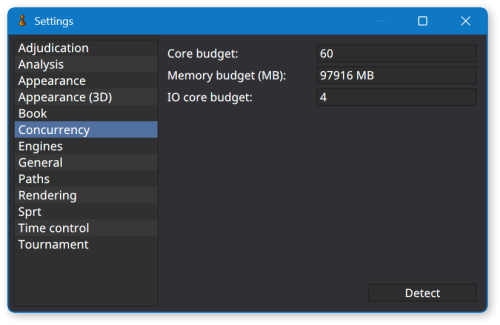
Click Tools > Settings. Select Concurrency in the left panel of the Settings dialog. Set your CPU core budget. I have a 64 core PC, so I set my budget to 60 cores, leaving 4 cores (8 logical processors) for the operating system and other applications.
Click Tournament > New Tournament. Create a round robin tournament named Division 1. Assign a corresponding Div1.pgn filename. Select engines that belong in this topmost division, cycles, time control, book, adjudication, etc.
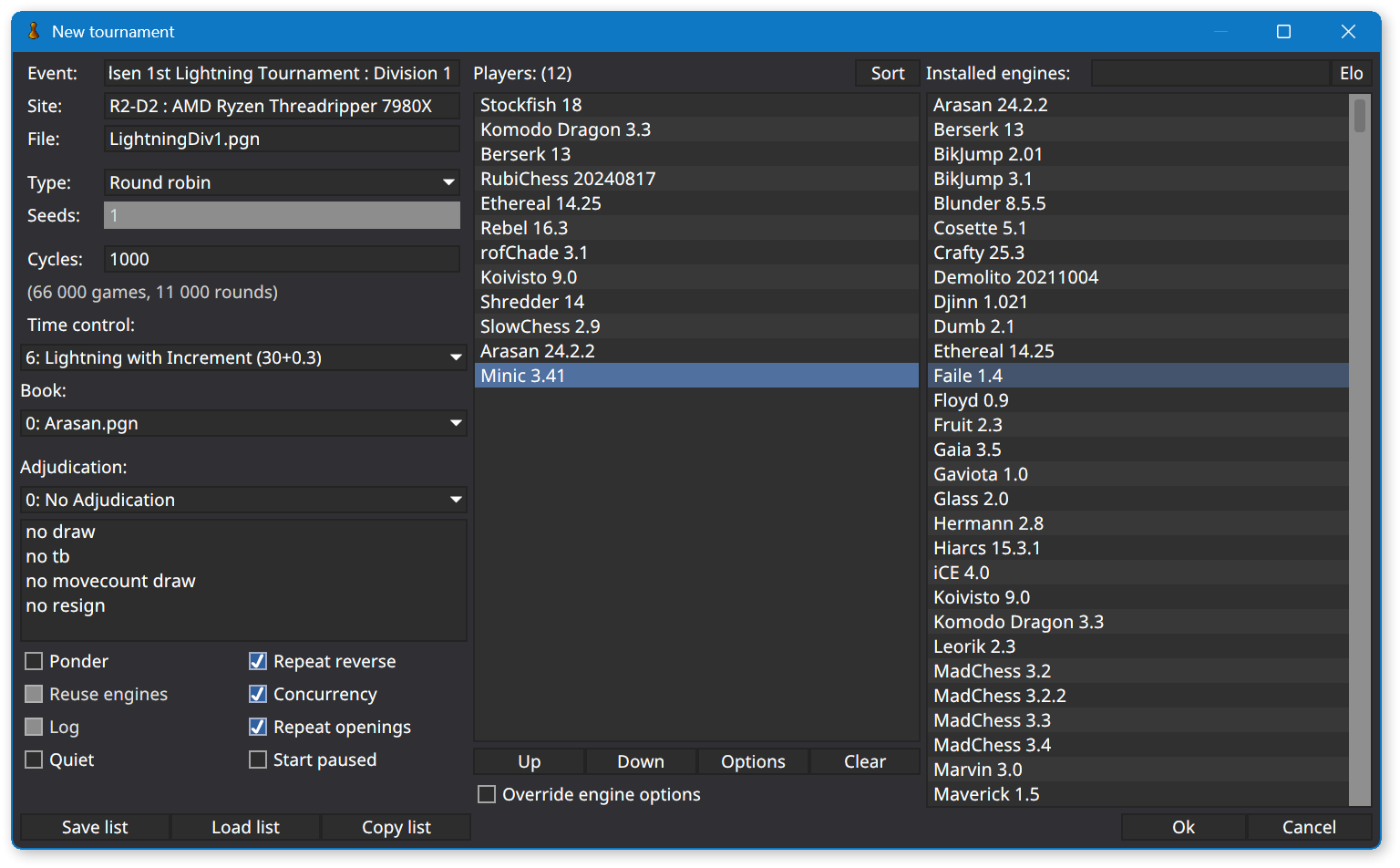
Click the OK button. Myracle will allocate all 60 CPU cores from the concurrency budget to Division 1 games.
Click Tournament > New Tournament. Create a round robin tournament named Division 2. Click the OK button. As games from Division 1 complete, Myracle will allocate CPU cores to Division 2 games until 30 cores are assigned to each divisional tournament. Repeat the process for Division 3 (Myracle will allocate 20 cores to each divisional tournament), etc.
Ensuring Engines Are “Connected” To Make Rating Estimation Possible
Now, to satisfy the Ordo rating utility, create cross-division tournaments. Create a Divisions 1-2 tournament, a Divisions 2-3 tournament, etc. This eliminates disconnected groups of engines whose ratings cannot be estimated because, without cross-divisional tournaments, the engines compete in isolated rating pools.
I realize cross-divisional tournaments are not needed if you already have a collection of engine games. Ordo can successfully estimate engine ratings when provided existing games and new games run by the Myracle GUI. However, this technique is valuable if you’re establishing a new “virgin” rating list (perhaps with different time control, opening book, pondering, adjudication, or tablebase settings than existing rating lists you maintain). In my typical setup, cross-division tournaments include fewer engines than divisional tournaments, and therefore, require fewer games even if each engine plays the same number of games against each opponent as in divisional tournaments.
I realize cross-divisional tournaments are not needed if you already have a collection of engine games… However, this technique is valuable if you’re establishing a new “virgin” rating list.
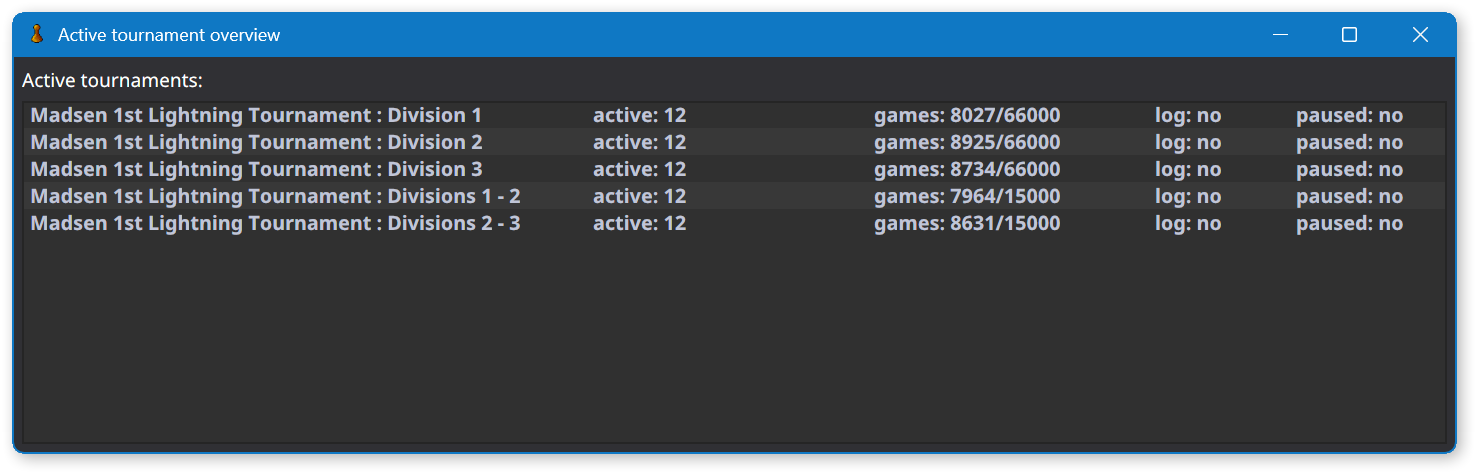
Click View > View Active Tournaments. Myracle displays the divisional and cross-division tournaments you’ve started, along with counts of each tourney’s active & completed & total games, and an indication whether each tourney is active or paused. Pausing an individual tourney frees up CPU cores to be allocated to the remaining active tournaments.
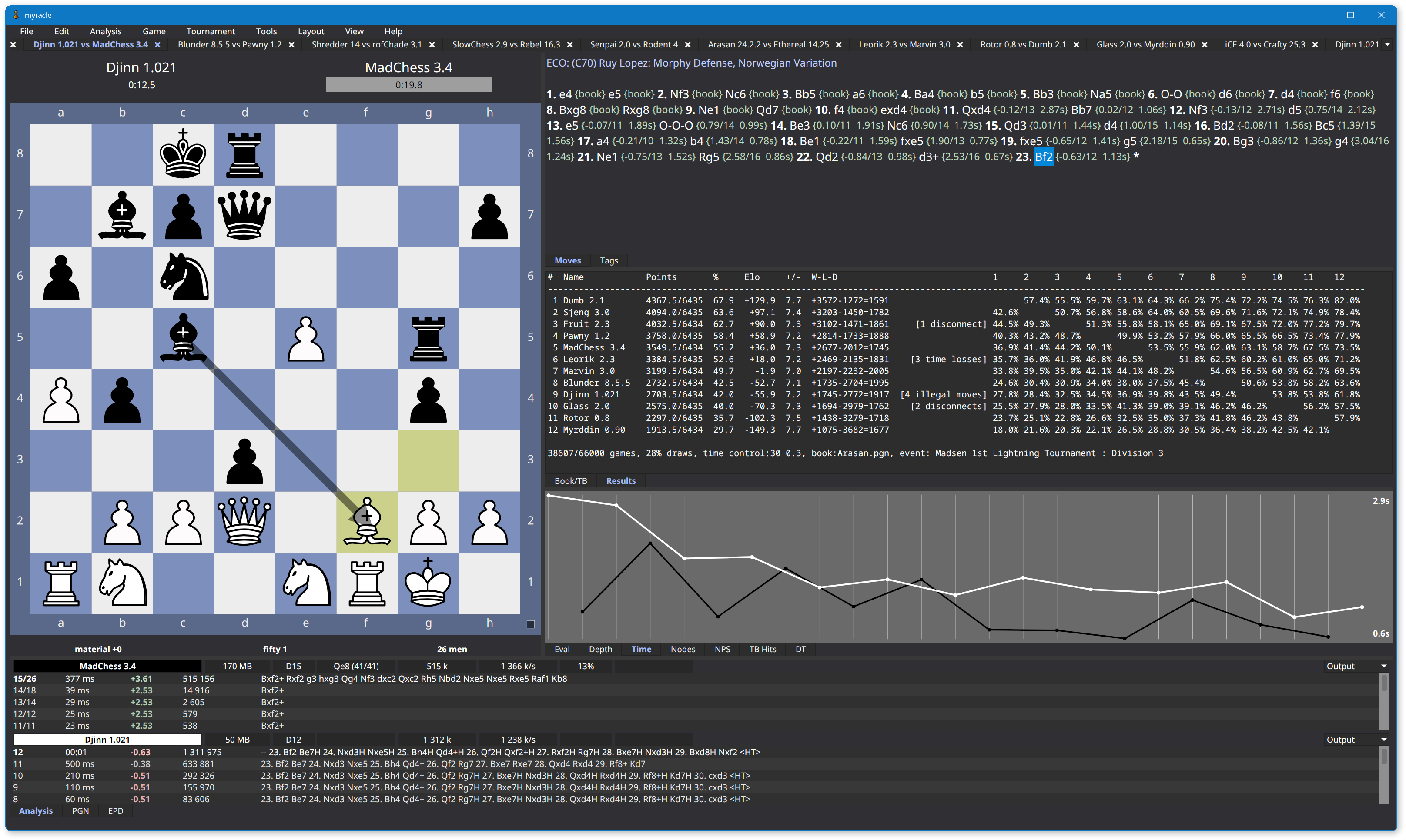
While the tournaments are progressing, you may watch games via Myracle’s tabbed windows.
Also while the tournaments are progressing, run the Ordo utility to estimate engine ratings. Include the PGN filename of every divisional and cross-division tourney. Notice how three engines at the bottom of Division 1 have played more games than other engines due to participating in both the Division 1 tourney and the Divisions 1-2 tourney. In the cross-division tourney, they compete against the top three engines from Division 2 (not shown).
.\ordo-win64.exe -m LightningAnchors.txt -U "0,1,2,6,4,7,8,9,5,11" --exclude=ExcludedEngines.txt `
  -o ComputerGamesLightning.txt -j ComputerGamesLightningMatchups.txt -W -D -s 10 -M `
  LightningDiv1.pgn LightningDiv2.pgn LightningDiv3.pgn LightningDiv1-2.pgn LightningDiv2-3.pgn
   # PLAYER                :  RATING  ERROR  CFS(%)  PLAYED     W     D     L   (%)  OppAvg
   1 Stockfish 16.1        :  3805.0    4.3     100    7115  2961  4130    24    71  3643.9
   2 Komodo Dragon 3.3     :  3757.5    4.3      55    7113  2246  4665   202    64  3648.3
   3 Berserk 13            :  3757.0    5.6     100    7114  2232  4685   197    64  3648.3
   4 RubiChess 20240817    :  3710.3    5.6     100    7115  1559  5096   460    58  3652.6
   5 Ethereal 14.25        :  3695.5    5.9     100    7114  1382  5144   588    56  3653.9
   6 Koivisto 9.0          :  3655.7    7.2      94    7114  1015  5052  1047    50  3657.6
   7 Rebel 16.3            :  3650.0   ----     100    7114   905  5192  1017    49  3658.1
   8 rofChade 3.1          :  3638.8    5.3     100    7115   864  5003  1248    47  3659.1
   9 Shredder 14           :  3564.2    5.3      51    7113   350  4509  2254    37  3665.9
  10 Arasan 24.2.2         :  3564.1    3.6      56   12114  1874  7453  2787    46  3592.0
  11 SlowChess 2.9         :  3563.7    3.5     100   12114  1844  7497  2773    46  3592.1
  12 Minic 3.41            :  3526.7    4.5     100   12113  1368  7148  3597    41  3597.1
     etc
Due to fewer games, the cross-division tournaments will complete before the divisional tournaments. This frees up CPU cores to be allocated to the remaining active tournaments.
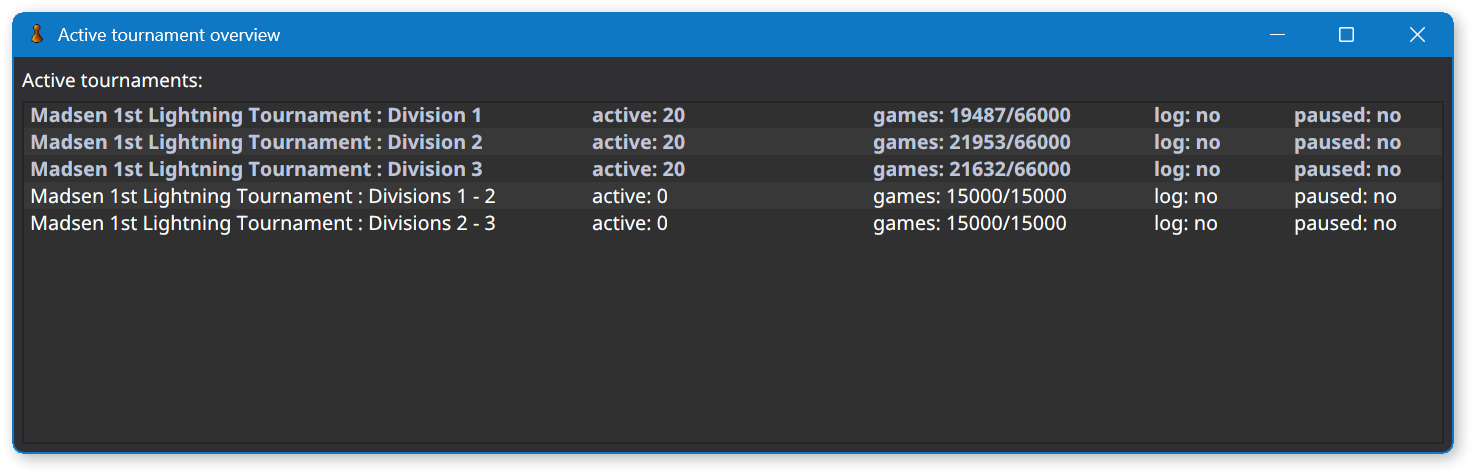
You may start another tournament unrelated to the new rating list you’re establishing. Myracle will fairly allocated CPU cores to the unrelated tourney. For example, in addition to the new Lightning (30s + 0.3s) rating list I’m establishing, I decided to update Stockfish’s rating in my Bullet list by running a gauntlet tourney with the latest version of the engine. You may start as many tournaments as you wish. Myracle will fairly allocate CPU cores to each active tournament.
Adjusting Priority of Individual Tournaments
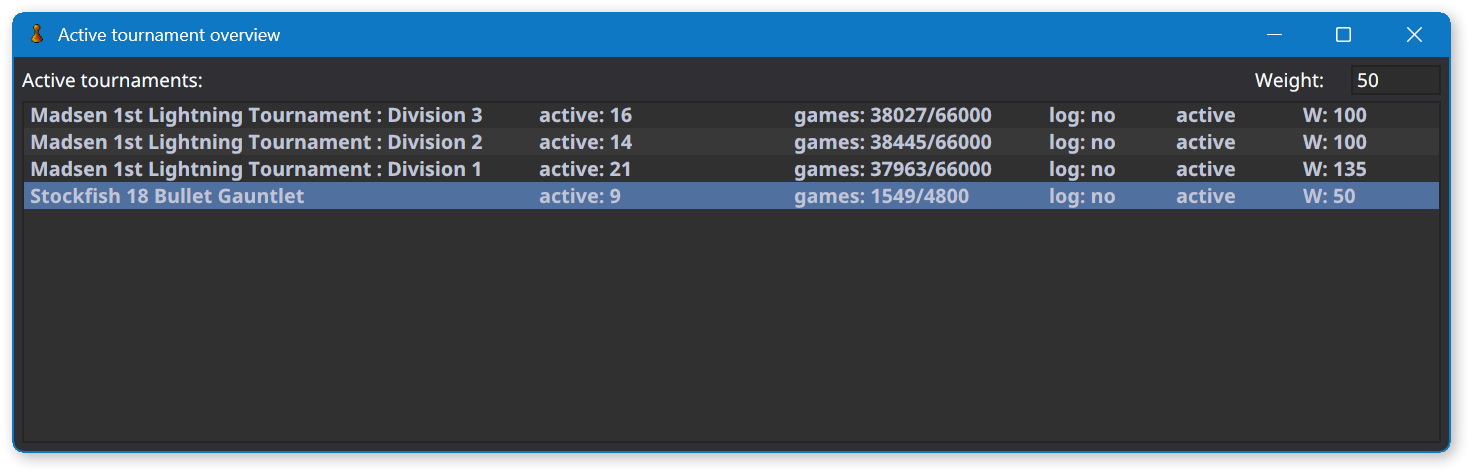
If you’re paying close attention, you noticed a new column in the last screenshot. That’s connected to my shameless request:
A nice feature to address this [cross-division tourneys completing before divisional tourneys] would be if Myracle’s View Active Tournaments dialog provided a column where I can enter a weight or a percentage, indicating how the scheduler should assign CPUs to games (favoring some tournaments over others). This would enable me to reduce the weight of the cross-division tournaments so they complete approximately at the same time as the larger divisional tournaments.
Two days later, Martin implemented the feature!
As you can see in the screenshot above, I’m using it and- at a glance- the scheduler appears to allocate CPU cores in accordance with tourney weights. Martin was quick to point out slow time controls may clog the scheduler. That isn’t the case with my mix of Lightning and Bullet time controls. A Lightning time control combined with an ample CPU budget ensures a game completes every few seconds, making it easy for the scheduler to allocate CPU cores in accordance with tourney weights.
Adjusting weights when exclusively running long time control tourneys is more likely to cause either idle CPU cores or unfair allocation of CPU cores. But, in my opinion, attempting to fine tune tourney priority in such a simultaneous multiple tournament setup falls more in the realm of user error (magical thinking) than application bug.
This post is by no means an exhaustive review of the Myracle GUI. It has many other excellent features. But it’s more helpful to focus on a single topic- running multiple tournaments simultaneously- than attempt to cover everything. Check out the Myracle GUI. I think you’ll enjoy working with it!
 I work as a Software Architect at an insurance company. We're building a modern tech stack in the cloud using C#, Azure, ASP.NET Core, Angular, TypeScript, etc.
What a discovery! I’m going to start organizing local tournaments again, thanks!